Loyalty Insights

How to Create an Account and Set Up Your Business on Arova

Learn how to make your free Arova account and set up your business profile in 3 simple steps.

How to Create an Account and Set Up Your Business on Arova

Welcome to Arova! We are very happy to help you grow your business. In this guide, we will show you how to make your free account. We will also help you set up your business profile. It is very easy and only takes five minutes!

Why Do You Need an Arova Account?

An Arova account helps you reward your customers. When customers get rewards, they want to buy from you again and again. Our system is simple and runs on any phone or computer.

Step 1: Sign Up

First, go to our registration page. You will see a form like the one below. Fill in your personal details:
  • First Name and Last Name: Type your name here.
  • Email: Type your email address. This is how you will log in.
  • Phone Number: Type your phone number.
  • Password: Create a strong password to keep your account safe.
Next, fill in your business details:
  • Business Name: The name of your shop (for example, "Kofi's Bakery").
  • Business Category: What kind of shop you run (like Restaurant, Spa, or Retail).
  • Business Country: Select the country where your shop is located.
  • Currency: Choose the money you use (like GHS for Ghana Cedi).
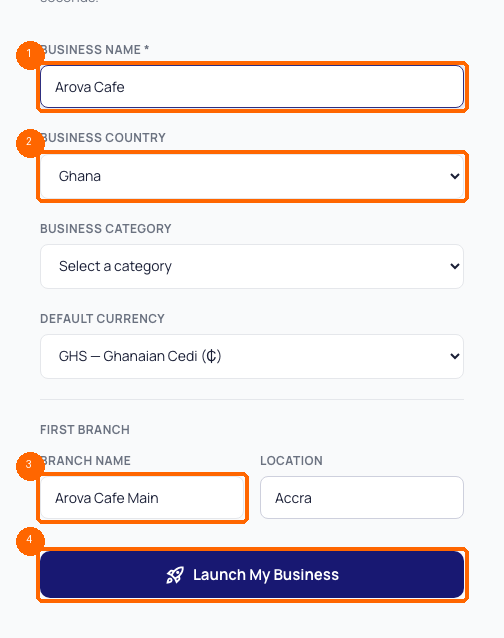
Check the box to agree to our terms, then click the Register button! Business Setup Form

Step 2: Set Up Your Business Profile

After you register, you will see the business setup page. Here, you will write down your business name again and check your country and currency.

You must also set up your first Branch. A branch is your physical shop. Type the name of the branch (for example, "Main Street Shop") and its location (for example, "Accra").

Click Submit to finish your setup. Now, your business dashboard is ready to use!

Step 3: Log In Anytime

To view your dashboard later, go to arova.com/auth/login/. Type in your email and password, then click the log in button. You will go straight to your main dashboard.

---

Frequently Asked Questions

Can I add more branches later?

Yes! You can add more shop locations from your settings page anytime.

Can I change my business currency later?

It is best to choose the right currency at the start. If you need to change it later, please contact our support team.
Grow with Arova Digital

Why Choose a Digital Loyalty Platform?

Arova is designed to help small and medium businesses keep their customers happy, increase repeat visits, and make more money.

groups

Keep Your Customers

Instead of losing customers to competitors, give them a reason to return. Reward every visit and watch customer lifetime value grow.

payments

Earn More Revenue

Loyal customers spend 67% more than new ones. By encouraging repeat visits, you boost your bottom line without high ad costs.

qr_code_2

App-Free QR Scanning

No heavy app downloads required. Customers scan a unique QR code at your checkout and access their rewards wallet instantly.

sms

Direct SMS Campaigns

Reach customers directly with dynamic deals, birthday rewards, and announcements that bring them back to your store.

Start Growing Your Customer Base Today

Join businesses using Arova to run multi-branch loyalty programs and grow their sales. Setup takes under 10 minutes.

Get Started Free arrow_forward

Frequently Asked Questions

Everything you need to know about growing your business with digital loyalty.

How does Arova keep customers coming back? add

Arova builds a seamless digital reward connection between your brand and your customers. They earn points on purchases and can unlock tiers, rewards, and birthday promos. This gamified experience makes them loyal advocates of your shop.

Can I track performance across branches? add

Yes. Arova provides a multi-branch analytics dashboard. You can monitor which locations have the most check-ins, track staff who issue rewards, and see total customer visits across all locations.

Do I need to integrate Arova with my POS? add

No POS integration is needed. Arova works as a standalone cloud platform. You can access the merchant scanner via any mobile device, tablet, or web browser to award points and scan loyalty codes.