

Do you want to reward your customers? Arova makes it super easy to give points when they buy from you. In this guide, you will learn how to search for a customer, register a new one, and give them points for their purchase.
Step 1: Open the Transactions Page
Log in to your dashboard and click on Transactions. You will see a search box that looks like the image below.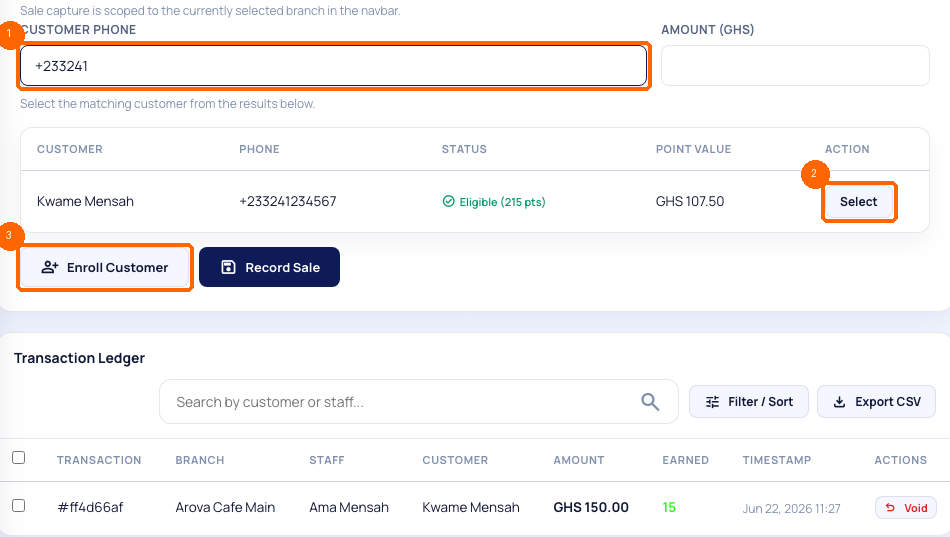
Type the customer's phone number into the search box.
- If the customer is already registered: Their name will show up. Click the Use Customer button next to their name.
- If the customer is new: Click the Enroll Customer button. A small form will open. Type their name and phone number. Ask them if they agree to get text messages from you. Click save, and their account is created!
Step 2: Enter the Sale Amount
Once you select the customer, their details will appear in the transaction form.
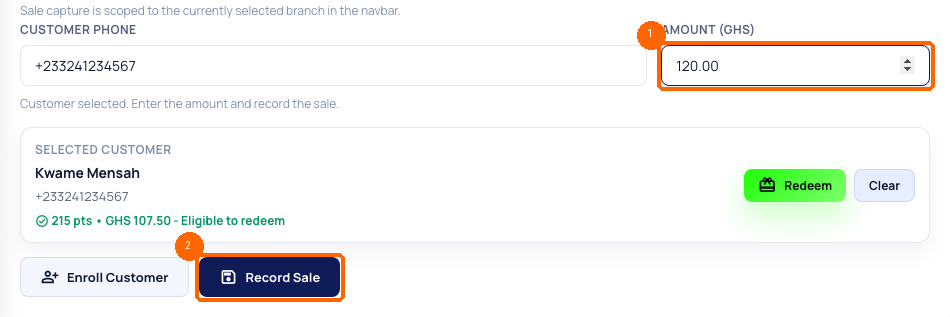
Type the total money the customer spent into the Amount box. For example, if they bought food for GHS 120, type `120.00`.
Step 3: Submit and Give Points
Click the Record Sale button. The Arova system will calculate the points automatically!For example, if your earn rate is 0.1 points per GHS 1, a customer who spends GHS 150 will get 15 points. They will receive a text message immediately telling them about their new points. It is that simple!
---