

When your customers get enough points, they will want to trade them for rewards! We call this redemption. For example, they might trade 100 points for a free drink. This guide explains how to start a redemption and how to approve it.
Step 1: Open the Quick Redeem Modal
When a customer wants to use their points, go to the transactions page on your dashboard. Select the customer by typing their phone number.Click the Quick Redeem button. A pop-up box will appear like the image below.
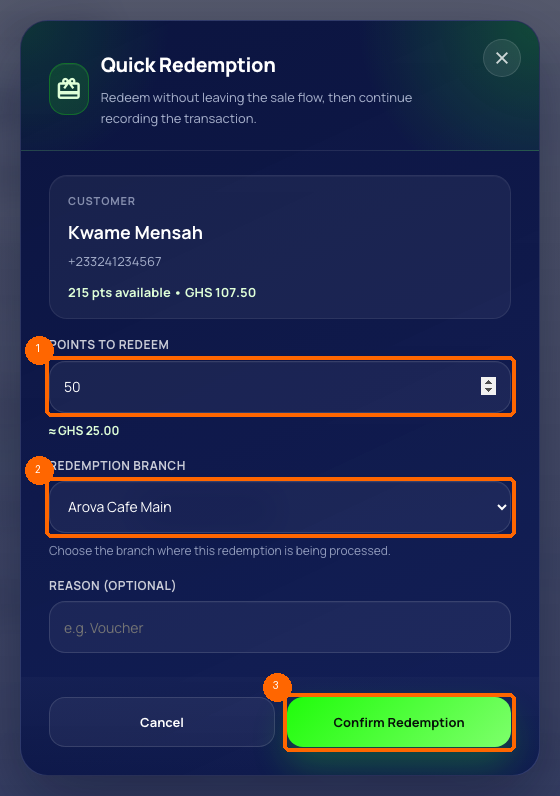
- Type the number of points the customer wants to spend.
- Select the branch where the customer is standing.
- Click Submit.
Step 2: Understanding High-Value Approvals
To protect your business from fraud, Arova has a safety limit.- Low-value redemptions: If a customer spends a small amount of points, the reward is approved immediately.
- High-value redemptions: If the points are above your safety limit, the request goes into a Pending List. The customer cannot get their reward until the owner approves it.
Step 3: Approve Pending Requests
To approve a pending redemption, the business owner must log in. Go to the Redemptions Queue page under transactions. You will see a list of requests like the image below.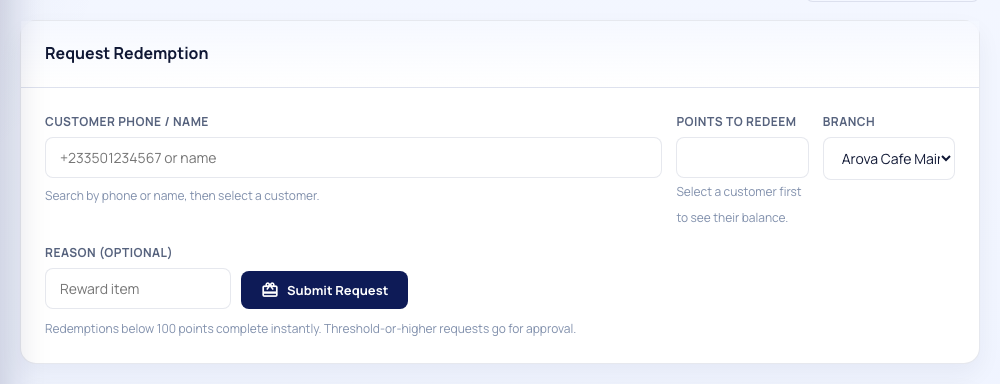
Find the pending request and click the Approve button. The owner must enter their secret secure PIN code to confirm the approval. This stops staff members from giving away free rewards without your permission!
---